In SQL Server, index or table compression offers the chance to create indexes that populate fewer pages and consume less drive space in the database.
What is data compression? For page compression,it shrinks the data by removing spaces, swapping data type types, for example, INT for BIGINT where applicable, etc. In the case of page compression, swapping out character strings for placeholders. There is more information here.
It is advantageous on larger, read only tables, or tables receiving a large number of INSERTS. However, it may not be a suitable implementation for busy and volatile tables with frequent UPDATEs and DELETEs. As always, results or ‘mileage’ may vary. So, test it well in staging prior to implementing it into production.
Using dbo.Users from the Stackoverflow2018, let’s look at clustered indexes. This looks like it should. A typical clustered index on any given table: nearly 9 million row and 140K+ pages that consumes approximately 1+ GB of drive space. A data page holds around 8K.

Using the system stored procedure sp_estimate_data_compression_savings, we can see the estimated compression if we implement ROW or PAGE compression. The stored procedure compresses about 5% of the table to achieve its estimate, returned as size_with_compression_setting(KB).
|
1 2 3 4 5 6 7 |
exec sp_estimate_data_compression_savings ‘dbo’,‘Users’,1,NULL,‘NONE’,NULL; GO exec sp_estimate_data_compression_savings ‘dbo’,‘Users’,1,NULL,‘ROW’,NULL; GO exec sp_estimate_data_compression_savings ‘dbo’,‘Users’,1,NULL,‘PAGE’,NULL; |
For ROW compression, the estimated compressed size is ≈ 70% ( 794672 / 1133552 ) of the original clustered index, PK_User_ID. PAGE compression, ≈ 65% (741008 / 1133552) of the original clustered index. A big difference.

Let’s create a new table called dbo.Users_copy and add a PAGE compressed clustered index (PK_Users_copy__compressed_id) and execute a couple of queries to check for performance.
|
1 2 3 4 5 6 |
SELECT * INTO dbo.Users_copy FROM dbo.Users; GO CREATE CLUSTERED INDEX PK_Users_copy__compressed_Id ON dbo.Users_copy(ID) WITH (DATA_COMPRESSION = PAGE); |
There is substantial reduction in drive space and page_count.

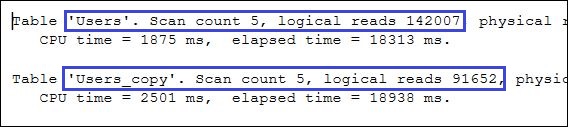
What about page reads using clustered indexes? Executing two SELECT queries with index hints, the queries execute index scans and each read the complete table. While the query executed against dbo.Users_copy reads two-thirds the number of pages, the CPU time is up compared to the query executed against dbo.Users. Within an on-premises box, the drive space savings might be beneficial for adding new hardware. In a cloud environment, the CPU time will cost more.
|
1 2 3 4 5 6 7 8 9 10 |
DBCC FREEPROCCACHE; GO SELECT DisplayName, Location FROM dbo.Users WITH(INDEX(PK_Users_Id)) WHERE DisplayName = ‘Sean’; SELECT DisplayName, Location FROM dbo.Users_copy WITH(INDEX(PK_Users_copy__compressed_Id)) WHERE DisplayName = ‘Sean’; |
Let’s check out adding compressed non-clustered indexes to dbo.Users.
|
1 2 |
CREATE INDEX IX_Users_DisplayName_INCLUDES_No_Compression ON dbo.Users(DisplayName) INCLUDE (Location); |
As expected, a quick review shows fewer pages created for the non-clustered index as well as less drive space usage compared to the clustered index. No surprise.

Again, using the system stored procedure sp_estimate_data_compression_savings, we can estimate compression when implementing ROW or PAGE compression on dbo.Users.
|
1 2 3 4 |
exec sp_estimate_data_compression_savings ‘dbo’,‘Users’,3,NULL,‘ROW’,NULL; GO exec sp_estimate_data_compression_savings ‘dbo’,‘Users’,3,NULL,‘PAGE’,NULL; |
ROW compression estimate is ≈ 68% ( 256752 / 367144 ) the size of the non-compress index. PAGE compression: ≈ 60% ( 222120 / 367144). Real potential drive space savings.

Now, let’s generate two additional non-clustered indexes, and compare these to the non-compressed non-clustered index on dbo.Users.
|
1 2 3 4 5 6 7 |
CREATE INDEX IX_Users_DisplayName_INCLUDES_Row_Compression ON dbo.Users(DisplayName) INCLUDE (Location) WITH (DATA_COMPRESSION = ROW); CREATE INDEX IX_Users_DisplayName_INCLUDES_Page_Compression ON dbo.Users(DisplayName) INCLUDE (Location) WITH (DATA_COMPRESSION = PAGE); |
The two new compressed non-clustered indexes yield sizable drive space reduction: ROW Compression: ≈ 65%. PAGE: ≈ 48%. And page counts show a big reduction too.

Let’s check out the reads on dbo.Users using its four existing indexes. I clear the buffer each query run.
|
1 2 3 4 5 6 7 8 9 10 11 12 13 14 15 16 17 18 |
DBCC FREEPROCCACHE; GO SELECT DisplayName, Location FROM dbo.Users WITH(INDEX(PK_Users_Id)) WHERE DisplayName = ‘Sean’; SELECT DisplayName, Location FROM dbo.Users WITH(INDEX(IX_Users_DisplayName_INCLUDES_No_Compression)) WHERE DisplayName = ‘Sean’; SELECT DisplayName, Location FROM dbo.Users WITH(INDEX(IX_Users_DisplayName_INCLUDES_Row_Compression)) WHERE DisplayName = ‘Sean’; SELECT DisplayName, Location FROM dbo.Users WITH(INDEX(IX_Users_DisplayName_INCLUDES_Page_Compression)) WHERE DisplayName = ‘Sean’; |
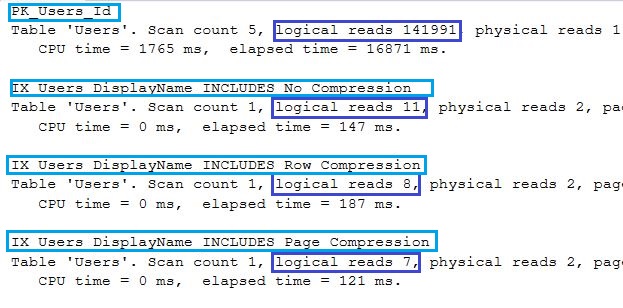
As expected, the clustered index scans the complete table, reading every page. The non-clustered indexes seek/hop/dive into the index and read the exact pages required. Notice the compressed indexes read fewer pages 11 vs 8 vs 7 not a huge difference on a 1 GB table with a two column indexes. On larger tables with a bazillion rows, the page reads and drive space savings would be hefty.
TAKE AWAY
Using compression will save drive space, reduce page read, and smaller index sizes will utilize less memory, reducing memory issues. Larger the table, the larger the benefit. This write up only investigated SELECT queries on a static table, and it may not be viable on tables with substantial DELETEs and/or UPDATES.
Next week, I write about DELETEs and UPDATEs with ROW and PAGE Compression.
Further Reading
Online Books: https://learn.microsoft.com/en-us/sql/relational-databases/data-compression/data-compression?view=sql-server-ver17
Erik Darling at Darling Data: https://www.youtube.com/watch?v=tHfeCstrDAw&t=58s
Paul Randal: https://www.sqlskills.com/blogs/paul/the-curious-case-of-tracking-page-compression-success-rates/
Kendra Little: https://kendralittle.com/2024/09/08/sql-server-page-compression-cpu-on-insert-update-delete/
Leave a Reply
You must be logged in to post a comment.